
Fluxo padrão do Odoo. Consulte também o procedimento KMEE para os módulos brasileiros.
Descontos em dinheiro e redução de impostos
Cash discounts are reductions in the amount a customer must pay for goods or services offered as an incentive for paying their invoice promptly. These discounts are typically a percentage of the total invoice amount and are applied if the customer pays within a specified time. Cash discounts can help the company maintain a steady cash flow.
Exemplo
Você emite uma fatura de 100 euros em 1º de janeiro. O pagamento total deve ser feito em 30 dias, e você também oferece um desconto de 2% se o cliente pagar em sete dias.
O cliente pode pagar € 98 até o dia 8 de janeiro. Após essa data, ele teria de pagar € 100 até o dia 31 de janeiro.
Uma redução de impostos também pode ser aplicada, dependendo do país ou da região.
Configuração
To grant cash discounts to customers, you must first set up the type of tax reduction, verify the gain and loss accounts, and configure new payment terms.
Reduções de impostos
Depending on the country or region, the base amount used to compute the tax can vary, which can lead to a tax reduction.
To configure how the tax reduction is applied, go to , and in the Taxes section, in the Cash Discount Tax Reduction feature, select one of the three following options:
- Sempre (mediante fatura)
O imposto é sempre reduzido. O valor base usado para calcular o imposto é o valor descontado, quer o cliente se beneficie do desconto ou não.
- No pagamento antecipado
O imposto é reduzido somente se o cliente pagar antecipadamente. O valor base usado para calcular o imposto é o mesmo da venda: se o cliente se beneficiar da redução, o imposto será reduzido. Isso significa que, dependendo do cliente, o valor do imposto pode variar após a emissão da fatura.
- Nunca
O imposto nunca é reduzido. O valor base usado para calcular o imposto é o valor total, quer o cliente se beneficie do desconto ou não.
Exemplo
Você emite uma fatura de 100 euros (sem impostos) no dia 1º de janeiro, com uma alíquota de 21%. O pagamento total deve ser feito em 30 dias, e você também oferece um desconto de 2% se o cliente pagar em sete dias.
Sempre (mediante fatura)
Data de vencimento |
Valor total devido |
Calcular |
|---|---|---|
8 de janeiro |
€ 118,58 |
(€98 + (21% of €98)) |
31 de janeiro |
€ 120,58 |
(€100 + (21% of €98)) |
No pagamento antecipado
Data de vencimento |
Valor total devido |
Calcular |
|---|---|---|
8 de janeiro |
€ 118,58 |
(€98 + (21% of €98)) |
31 de janeiro |
€ 121,00 |
(€100 + (21% of €100)) |
Nunca
Data de vencimento |
Valor total devido |
Calcular |
|---|---|---|
8 de janeiro |
€ 119,00 |
(€98 + (21% of €100)) |
31 de janeiro |
€ 121,00 |
(€100 + (21% of €100)) |
Nota
As Grades de impostos, que são usadas para o relatório de impostos, são computadas corretamente de acordo com o tipo de redução de impostos que você configurou.
O Tipo de redução de imposto de desconto pode ser pré-configurado corretamente, dependendo de seu pacote de localização fiscal.
Contas de ganhos/perdas com desconto de caixa
Com um desconto em dinheiro, o valor que você ganha depende de o cliente se beneficiar ou não do desconto. Isso inevitavelmente leva a ganhos e perdas, que são registrados em contas de inadimplência.
To modify these accounts, go to , and in the Default Accounts section, select the accounts you want to use for the Cash Discount Gain account and Cash Discount Loss account.
Condições de Pagamento
Cash discounts are defined on payment terms. Configure them to your liking by going to , and make sure to fill out the fields Discount % and Discount Days.
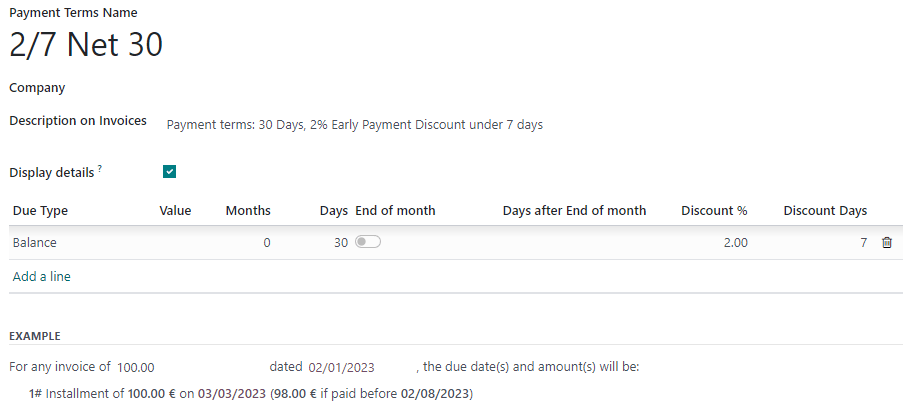
Aplicar um desconto em uma fatura de cliente
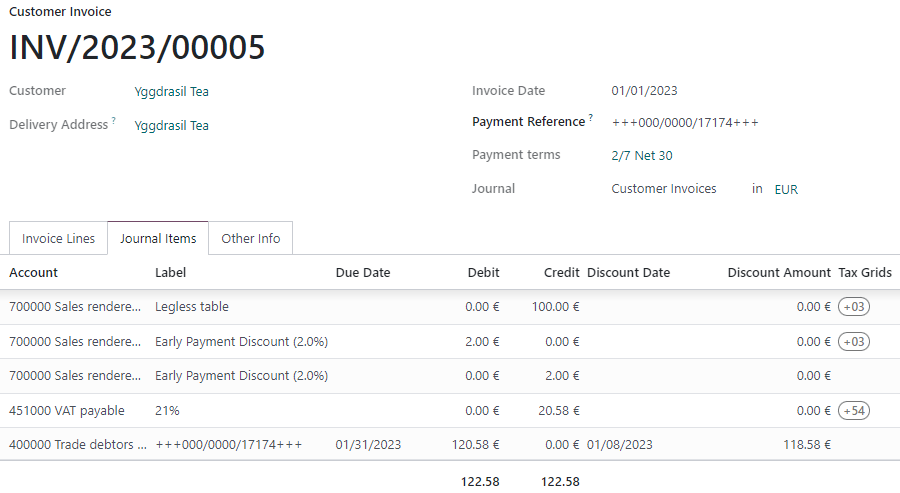
Apply a cash discount to a customer invoice by selecting the payment terms you created. Odoo automatically computes the correct amounts, tax amounts, due dates, and accounting records.
Na aba Itens de diário, você pode exibir os detalhes do desconto clicando no botão “Alternar” e adicionando as colunas Data de desconto e Valor do desconto.
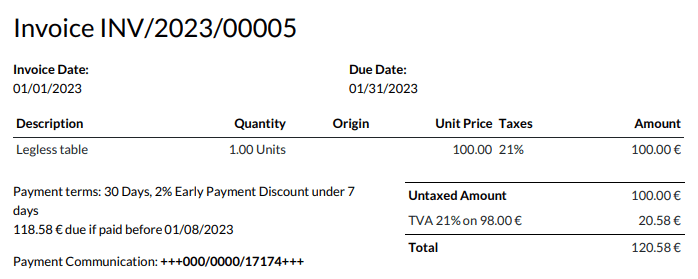
The discount amount and due date are also displayed on the generated invoice sent to the customer.
Reconciliação de pagamentos
When you record a payment or reconcile your bank statements, Odoo takes the customer payment’s date into account to define if they can benefit from the cash discount or not.
Nota
If your customer pays the discount amount after the discount date, you can always decide whether to mark the invoice as fully paid with a write-off or as partially paid.
Ver também