Odoo Sales: Close more deals in less time, no spreadsheets
From quotation to invoicing in one click, with smart pricing and automated approval
Manage the entire sales journey (quotations, orders, approvals, payment terms and commissions) on a single platform integrated with inventory, finance and CRM. No more emails to approve a discount and no more spreadsheets to track an order.
Sales Official Odoo module
Why Odoo Sales?
Real results our clients achieve.
Quotation in minutes, not hours
Templates with price lists by customer, currency and quantity cut preparation time by up to 80 percent. Sending by email with integrated electronic signature eliminates the PDF back and forth.
Revenue forecast with no surprises
Every confirmed order feeds the cash flow in Finance and the recurring revenue report. Your leadership sees the revenue forecast in real time, with no manual consolidation.
Discount control with automatic approval
Set discount limits by team or salesperson: above the limit, the order enters an approval queue for the manager. No deal goes below the minimum margin without formal validation.
From order to NF-e with no re-typing
A confirmed order automatically generates a delivery order, stock picking and invoice. With the Brazilian localization, the NF-e is issued directly by Odoo, cutting the cost of integrating with legacy systems.
Features
What's included in this module.
Quotations and Orders in a Single Flow
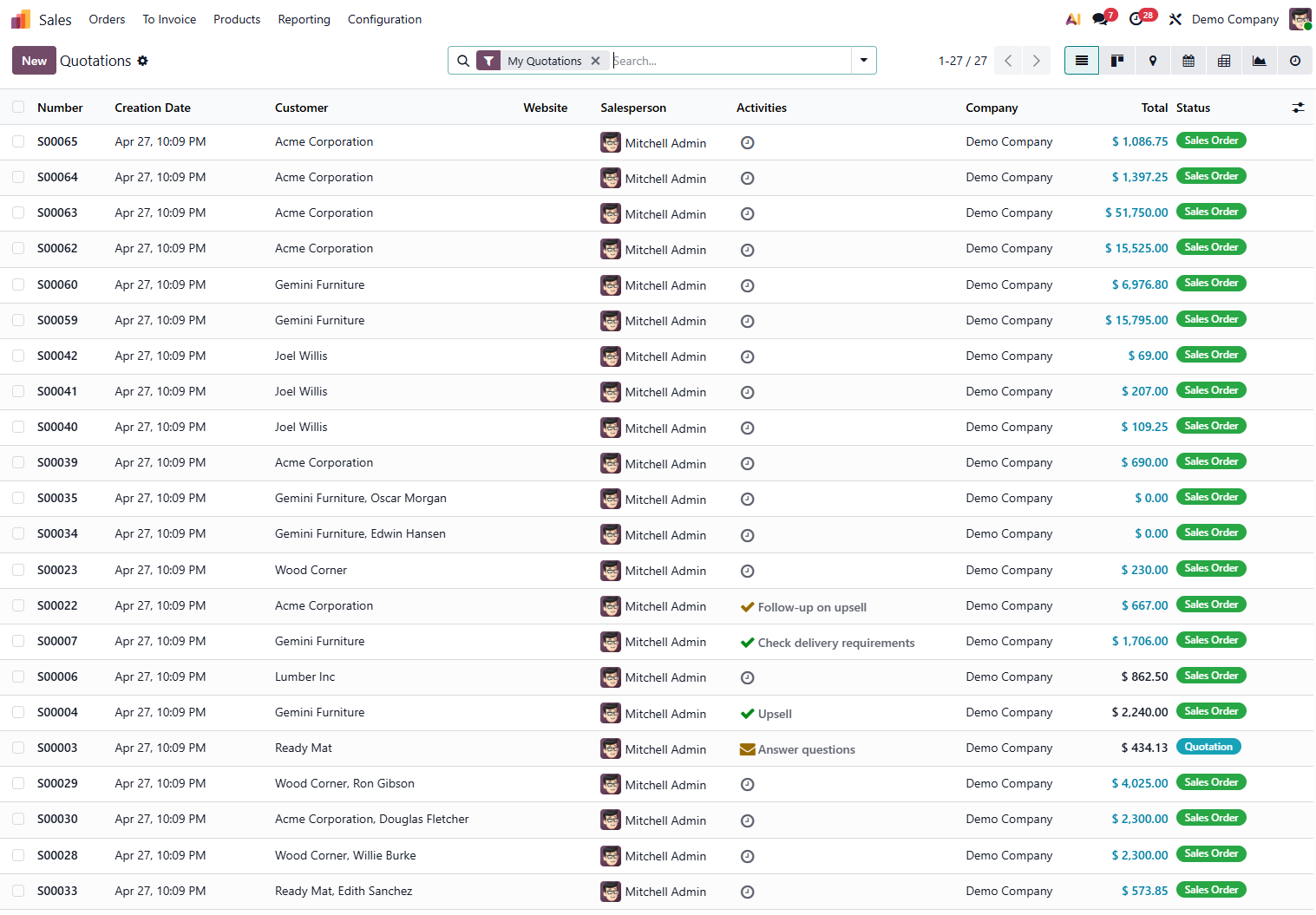
Create quotations with multiple product variants, tiered quantities and differentiated commercial terms. Confirm with one click and the system converts it into a sales order with a sequential number and complete traceability.
Multidimensional Price Lists
Configure prices by customer, segment, sales channel, currency or volume with priority rules. Native support for price tables with a validity date, essential for INPC/IPCA adjustments in recurring contracts.
Electronic Signature of Proposals
Send the proposal by email with a self-service portal: the customer views, comments and signs electronically without leaving the browser. The acceptance records date, time and IP, serving as legal evidence of the contract.
Configurable Products and Sales Kits
Sell products with variants (color, size, voltage) or build kits that automatically explode into components on the production order or stock picking. Ideal for manufacturing and distributors.
Commissions and Targets per Salesperson
Set revenue targets by salesperson, team or region and calculate commissions with flexible rules (fixed amount, percentage of margin, tiered). The dashboard consolidates ranking, average ticket and conversion rate in real time.
Payment Terms and Installments
Create payment terms with multiple due dates, percentages and business or calendar days. Odoo automatically generates the installments in the invoice and feeds accounts receivable with the correct dates for bank reconciliation.
Order-Based Replenishment Rules (MTO)
Confirming an order can automatically trigger a purchase or production order via a Make to Order rule. The salesperson sees the stock status and the promised delivery date before confirming.
Returns and Credit Notes Management
Process partial or full returns directly from the original order with bidirectional traceability. The system generates the credit note, reverses the stock and adjusts accounts receivable with the correct return CFOP.
Sales Reports and Margin Analysis
Dashboards with revenue by product, customer, salesperson, region and period with drill-down to the order line. Gross margin analysis cross-references the updated cost price with the actual sales price.
Self-Service Customer Portal
Each customer accesses a secure portal to view pending quotations, orders in progress, invoice history and delivery status. Reduces calls to support and improves the post-sale experience.
Native Integration with CRM and Helpdesk
A won opportunity in the CRM converts into a sales quotation with one click, preserving history and negotiated products. Support tickets can chain into sales orders for parts or services.
Native integrations
Odoo Sales connects natively with other Odoo modules, no external integration.
Why implement with KMEE
KMEE has been implementing Odoo Sales for over 8 years in Brazilian companies across manufacturing, distribution, retail and services. Our differentiator is getting the fiscal configuration right from the start: price tables with the tax burden built in (ICMS, IPI, PIS/COFINS), order types aligned with the CFOP of each operation and an approval flow integrated with the company's actual hierarchy. We are active OCA contributors and maintain localization modules that cover the gaps Odoo Community still does not solve natively for Brazil.
About KMEEWho it's for
Scenarios where this module delivers the most value.
Distributor with Price Table by Region
A national distributor configures price lists by state with ICMS-ST taxes built in. The salesperson builds the order on their phone and syncs on connection, with no risk of selling below the fiscal cost.
Manufacturer with a Make to Order Cycle
An equipment manufacturer uses configurable orders: the customer chooses the specifications, the system calculates the lead time based on production capacity and triggers the production order automatically.
SaaS and Tech with Recurring Billing
A software company manages annual license contracts with automatic renewal, contractual IGPM adjustment and automatic issuance of the NFS-e with no human intervention.
Consulting Firm with Proposal Approval
A consulting firm configures quotations with estimated hours per project phase. Internal approval above R$ 50k automatically chains into the creation of the project in the Project module.
Frequently Asked Questions
Does Odoo Sales issue NF-e directly or does it need an integration?
With the Brazilian localization installed (l10n_br OCA/l10n-brazil), the NF-e is issued directly from the sales order or the invoice generated by it, via the SEFAZ web service. There is no need to export XML to an external issuer. KMEE installs, certifies and trains your fiscal team on the complete process.
How do you configure differentiated prices by state (ICMS by state)?
Odoo's price lists allow you to create rules by customer category, and the Brazilian localization calculates the correct ICMS by state using the interstate rate table. For Tax Substitution (ICMS-ST), KMEE configures the MVA and IVA-ST formulas by NCM and destination state directly in the fiscal rules.
Is it possible to control credit limit and block an order automatically?
Yes. Odoo has native credit limit control on the customer record; orders that exceed the limit enter an approval queue or are blocked automatically. The OCA sale_stock_picking_blocking module also blocks shipping for customers with overdue invoices.
How does salesperson commission work in Odoo?
The OCA sale_commission module implements flexible rules: fixed percentage, tiered by target, by product or by customer, calculated on gross revenue or margin. KMEE installs and configures the rules according to your company's commercial policy.
Does Odoo Sales work for a company with multiple CNPJs (branches)?
Yes. In Odoo's multi-company model, each CNPJ is a separate company with its own chart of accounts, NF-e series and fiscal rules, while sharing the product catalog, customers and sales team according to the access configuration. KMEE designs the multi-company structure considering the fiscal implications from the start.
Industries that use it
Complete solutions for your industry.
- Retail POS, e-commerce, multichannel inventory management and integrated financial control.
- Distribution WMS, route planning, fleet management and full fiscal integration.
- Manufacturing MRP, production planning, quality control and end-to-end traceability.
- Services Project management, timesheets, recurring contracts and automated invoicing.
Explore all Odoo modules
View full catalogStart with a free assessment
Thirty minutes to understand your operation and tell you what to fix first, in the right order. No commitment.