Odoo Appointments: Online scheduling integrated with CRM and calendar
Online scheduling with customers
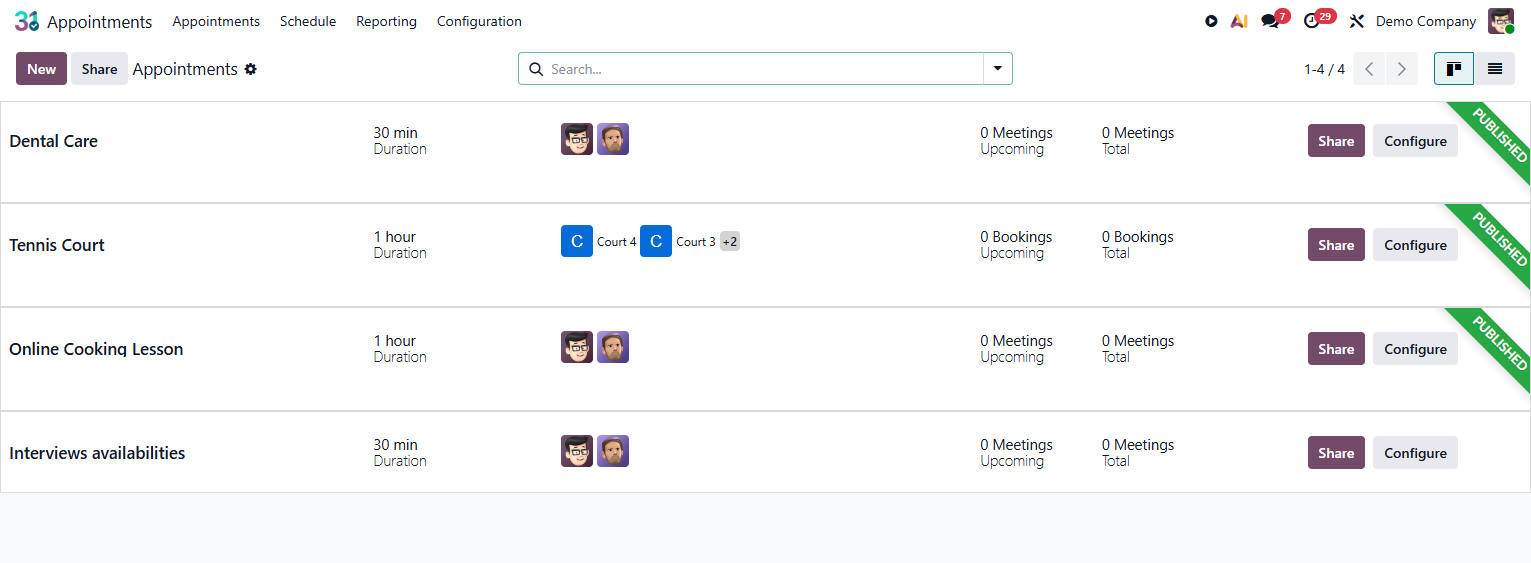
Let customers schedule meetings, consultations or appointments directly on your website, with no back and forth emails. Odoo Appointments shows the real availability of your team, confirms by email/SMS, creates the event in Google Calendar or Outlook and links it to the lead in the CRM.
Services Official Odoo module
Why Odoo Appointments?
Real results our clients achieve.
Customers schedule with no middleman
Public scheduling link on the website or in the signature email. The customer picks the available time and confirms on their own, with no assistant, with no back and forth emails.
Automatic confirmation by email and SMS
Immediate confirmation by email with a link to add the event to Google Calendar or Outlook. SMS reminder X hours before the appointment to reduce no shows.
Lead created automatically in the CRM
Every prospect appointment automatically creates or updates the lead in the CRM with the provided data and the scheduled time. The salesperson is notified instantly.
Real availability, in real time
The calendar shows only the times that are actually available, cross checked against Google Calendar, Outlook and other appointments in Odoo.
Features
What's included in this module.
Public Scheduling Page
Configurable scheduling page with service type, duration, availability and instructions. Embeddable on the website via iframe or direct link.
Multiple Appointment Types
Configure different types: product demo, sales meeting, technical consultation, support appointment, each with its own duration, team and rules.
Availability by Team Member or Team
The customer chooses a specific team member or lets Odoo distribute automatically among the available team members based on workload.
Google Calendar and Outlook Integration
Two way sync with Google Calendar and Microsoft Outlook. External appointments automatically block availability in Odoo Appointments.
Automatic Confirmation and Reminders
Immediate confirmation email with a link to add the event to the calendar. Configurable reminder by email and/or SMS before the scheduled time.
Lead Creation in the CRM
Scheduling by new prospects automatically creates a lead in the CRM with all the data provided, the appointment date and the assigned salesperson.
Rescheduling and Cancellation
The customer reschedules or cancels via the link in the confirmation email, with no need to contact the company. Automatic notification to the responsible team member.
Appointment Reports
Volume of appointments by type, team member and period. No show rate, rescheduling rate and cancellation rate for operational optimization.
Native integrations
Odoo Appointments connects natively with other Odoo modules, no external integration.
Why implement with KMEE
KMEE implements Odoo Appointments integrated with the customer's CRM, with appointment types configured for the specific sales process and synchronization with the team's Google Calendar or Outlook.
About KMEEWho it's for
Scenarios where this module delivers the most value.
Demos and Sales Meetings
Prospects schedule the demo directly from the website or from the prospecting email, eliminating the back and forth to set a time and increasing the conversion rate.
Clinics and Health Services
Patients schedule appointments online with real availability by professional, automatic confirmation and SMS reminder to reduce no shows.
Consulting Firms and Lawyers
Customers schedule initial consultations directly in the consultant's or lawyer's calendar, with a briefing form and an automatic online meeting link.
Technical Services and Assistance
Customers schedule a technical visit with real availability of technicians by region, integrated with Field Service for automatic creation of the service order.
Frequently Asked Questions
Can the customer schedule without creating an Odoo account?
Yes. The scheduling page is public and does not require an Odoo account. The customer provides name, email and the requested data, picks the time and confirms.
Does Odoo Appointments sync with Google Calendar?
Yes. With the Google Calendar integration, scheduled appointments automatically appear in the team member's calendar and Google events block availability in Odoo.
Does scheduling automatically create a lead in the CRM?
Yes. New prospects who schedule have a lead created in the CRM with the data provided in the form, the scheduled service type and the assigned salesperson, with no manual action.
Is it possible to send an SMS reminder before the appointment?
Yes. Configure automatic reminders by email and/or SMS (via Odoo SMS Marketing) with the desired lead time to reduce no shows.
Industries that use it
Complete solutions for your industry.
Explore all Odoo modules
View full catalogStart with a free assessment
Thirty minutes to understand your operation and tell you what to fix first, in the right order. No commitment.