Stop losing knowledge when employees leave the company
Internal knowledge base integrated with your ERP
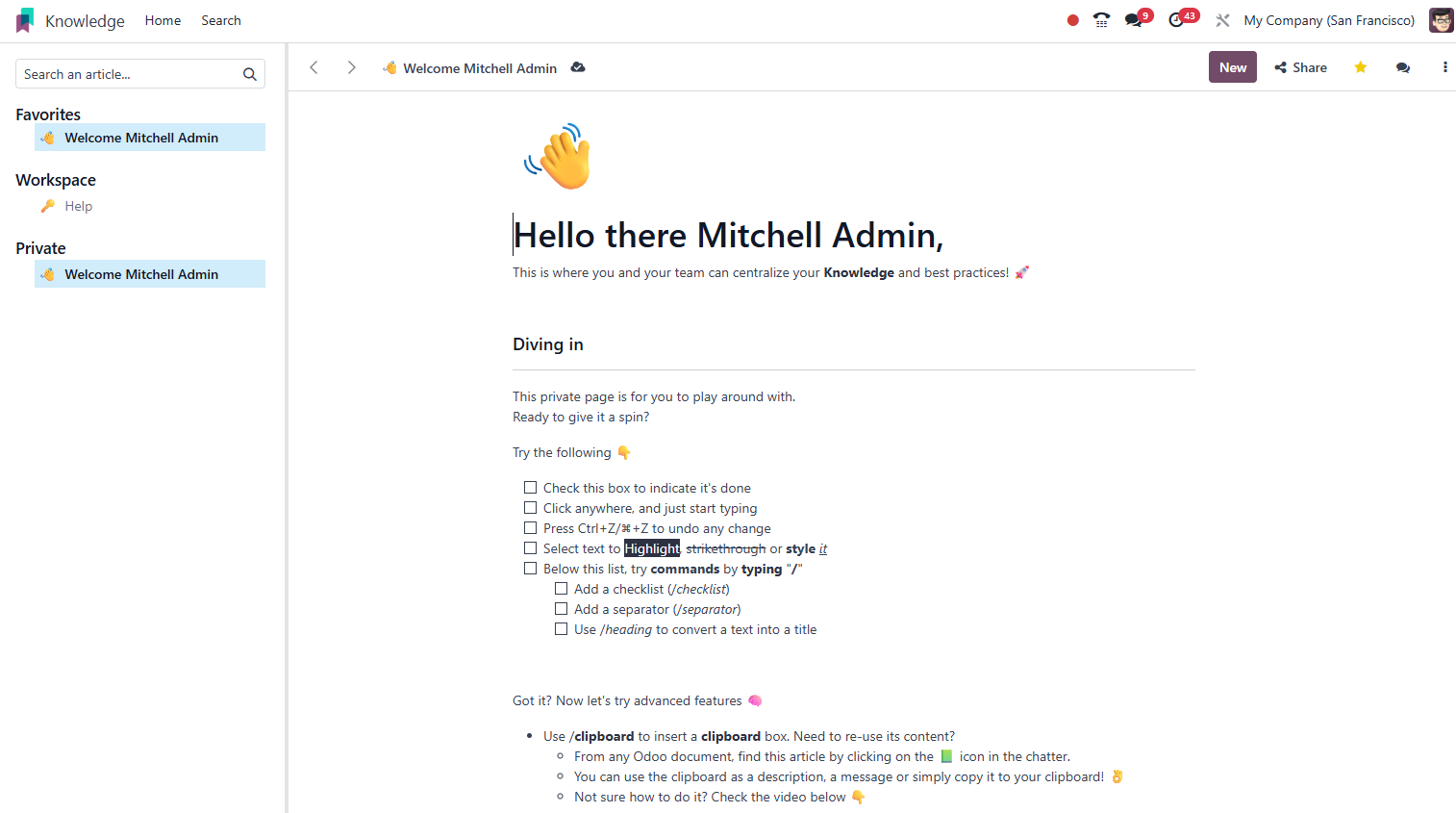
Odoo Knowledge is your company's internal wiki: structured articles, reusable templates, permissions by area and smart search, all integrated with CRM, Helpdesk and Projects. Replace network folders, outdated PDFs and scattered Notion pages with a single, versioned repository accessible from anywhere.
Productivity Official Odoo module
Why Odoo Knowledge?
Real results our clients achieve.
Hierarchical organization
Structure knowledge in spaces, sections and nested articles. Each area of the company has its own space with controlled access, avoiding information being exposed to those who should not see it.
Instant search
Find any article, procedure or template in seconds with full-text search. Knowledge indexes titles, content and metadata for precise results.
Ready-to-use templates
Create reusable document templates, onboarding scripts, audit checklists, production SOPs. Employees instantiate the template with one click.
Linked to Odoo records
Articles can be attached to helpdesk tickets, projects or manufacturing orders. The agent sees the right procedure in the right context, with no need to search.
Features
What's included in this module.
Rich editor (blocks)
A block-based editing interface similar to Notion: text, headings, lists, tables, images, code, videos and callouts. No technical knowledge of HTML or Markdown required.
Spaces with permissions
Create knowledge spaces for HR, IT, Sales or Operations, with control over who can read, comment or edit. Support for internal users and portals.
Version history
Every edit is saved with a timestamp and author. Restore any previous version of the article with one click, ensuring important information is not lost.
Reusable templates
Mark any article as a template and make it available to the team. Templates keep the standard structure and fields, speeding up the creation of new documents.
Helpdesk integration
Support agents access relevant articles directly on the ticket. An article can be sent to the customer with one click, with no need to copy and paste content.
Linking with tasks and projects
Projects can have their own linked knowledge base. Team members find specifications, design decisions and usage guides within the project's context.
External sharing
Generate public links to specific articles, shareable with customers or partners with no need to log in to Odoo.
Mentions and comments
Comment directly on parts of the article and mention colleagues with @ to ask for review or clarification. Notifications arrive via Discuss.
Integrated global search
Knowledge appears in Odoo's global search results. Type any term in the search bar and find articles alongside leads, invoices and tasks.
Native integrations
Odoo Knowledge connects natively with other Odoo modules, no external integration.
Why implement with KMEE
KMEE uses Odoo Knowledge to document its own internal implementation and support processes, which gives us real experience structuring knowledge bases for customers. Our approach includes migrating existing content (PDFs, wikis, network folders), creating a taxonomy of spaces by area and training internal editors to make sure the base stays up to date after go-live.
About KMEEWho it's for
Scenarios where this module delivers the most value.
Structured onboarding of new employees
The HR area maintains an onboarding space with tracks by role: training scripts, company policies, system guides and FAQs. New employees arrive on day one with immediate access to everything they need.
Answer base for customer support
The helpdesk team documents solutions for the most frequent issues. When a similar ticket comes in, the agent links the article to the reply and resolves it in seconds, keeping answers consistent.
Manufacturing SOPs accessible on the shop floor
Standard operating procedures are linked to manufacturing orders. The operator accesses the correct SOP on a tablet with no need to search network folders or printed manuals.
Process documentation for audits
Companies with ISO certification keep audited procedures in Knowledge with versioning. The auditor accesses the current version and the revision history with no requests to the team.
Frequently Asked Questions
Does Odoo Knowledge replace Notion or Confluence?
For companies that already use Odoo as their ERP, Knowledge offers the advantage of being natively integrated, with articles linked to tickets, projects and orders with no need for external integrations. The block-based editing interface is similar to Notion. For very advanced use cases (relational databases, external publishing of technical documentation), Notion or Confluence may still have specific advantages. Most KMEE customers choose Knowledge for the centralization and the zero additional license cost.
Is it possible to migrate content from Confluence or SharePoint to Knowledge?
Yes, with technical support. Odoo Knowledge accepts imports of HTML and rich text. KMEE develops migration scripts for the main formats (Confluence Cloud via API, SharePoint via HTML export, Notion via Markdown export). Migration quality depends on the volume and formatting of the original content, we run a preliminary assessment before estimating the effort.
Who can edit articles? Can I restrict access by department?
Yes. Knowledge has access control by space and by individual article. You define which users or groups can read, comment or edit each space. An HR policy article, for example, can be visible to all employees but editable only by the HR team. It is also possible to grant portal users (customers or partners) access to specific articles.
Does Knowledge have versioning? Can I recover an old version?
Yes. Every saved change creates a point in the version history with the date, time and author of the edit. Any previous version can be viewed and restored with one click. This is especially valuable for audited procedures, where it is necessary to prove which version was in effect on a given date.
Do Knowledge articles appear to the customer in the portal?
By default, Knowledge is internal. But you can generate a public link for specific articles (with no need to log in) or configure access for Odoo portal users. For customer-facing knowledge bases (a public help center), we recommend the eLearning module or the Odoo Website, which offer more publishing and SEO options.
Industries that use it
Complete solutions for your industry.
Explore all Odoo modules
View full catalogStart with a free assessment
Thirty minutes to understand your operation and tell you what to fix first, in the right order. No commitment.