Call your customers without leaving Odoo and log every call automatically
Telephony integrated with CRM, Helpdesk, and customer history
Odoo VoIP turns any computer into a business phone extension. One-click dialing directly from the lead or ticket, automatic call logging in the customer history, recording, and integration with Asterisk and Brazilian SIP providers such as Nvoip and Vivo Empresas. Your sales and support team gains productivity without switching screens.
Productivity Official Odoo module
Why Odoo VoIP?
Real results our clients achieve.
One-click dialing
Click any phone number in Odoo to start the call immediately. Zero typing, zero wrong numbers. The agent makes more calls in less time.
Automatic call logging
Every call (received, made, or missed) is automatically logged in the history of the lead, contact, or ticket. No manual note-taking required.
Recording and transcription
Record calls automatically according to company policy and access the recording directly in the customer record. Essential for team training and dispute resolution.
Productivity reports
Track call volume per agent, average handling time, and missed call rate. Data for goal tracking and team optimization.
Features
What's included in this module.
Softphone integrated into the browser
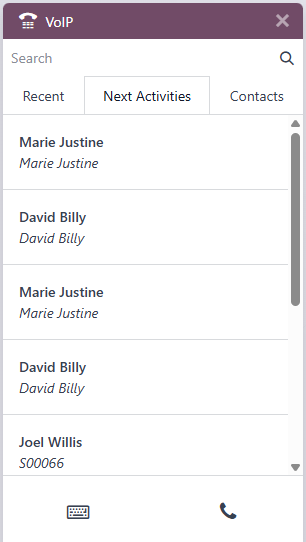
Telephony widget embedded in Odoo: the agent answers, transfers, and ends calls with no additional software to install. Compatible with Chrome and Firefox.
Integration with Asterisk (PABX)
Connect Odoo to your existing Asterisk PABX via the SIP protocol. Physical extensions and softphones coexist, taking advantage of the telephony infrastructure already in place.
Brazilian SIP providers
Documented configuration for Nvoip, Vivo Empresas, Claro Empresas, and other SIP providers in the Brazilian market. Local rates with DDR and Brazilian numbering.
CTI (Computer Telephony Integration)
When a call comes in, Odoo identifies the number and automatically opens the record of the corresponding customer, lead, or ticket. The agent already knows who is calling.
Call queue and distribution
Configure service queues with round-robin or skill-based distribution. Odoo displays queue position and wait time on monitoring dashboards.
Missed call logging
Unanswered calls automatically generate a callback activity in Odoo, assigned to the person responsible for the customer. No opportunity is lost for lack of a return call.
Notes during the call
The agent adds notes while talking, and the content is saved in the record's history when the call ends, with no interruption to the conversation.
Assisted and blind transfer
Transfer calls to colleagues with or without prior introduction. The receiver sees the customer's name and the call context before taking over.
Automatic logging on the contact and open leads
When the call ends (answered, declined, missed, or aborted), Odoo automatically posts on the contact's chatter the outcome, duration, and a link to the call record. If the number matches open opportunities in the CRM, the same note is posted on each of them, and the text is rewritten if the subject of the call changes afterward.
Also works on Odoo Community
For bases without Enterprise, telephony runs on the VoIP module maintained by the OCA community, which KMEE deploys and supports. Automatic call logging on the contact and in the CRM works the same way on both paths: the choice does not lock the customer into one edition.
Reports by period and agent
Dashboards with call volume, average duration, peak hours, and performance per agent. Exportable to Excel for management analysis.
Native integrations
Odoo VoIP connects natively with other Odoo modules, no external integration.
Why implement with KMEE
The link between telephony and the CRM is developed by KMEE: when a call ends (answered, declined, missed, or aborted), it is automatically posted on the contact's chatter and on every open opportunity with that phone number, with outcome, duration, and a link to the call record. That is what keeps the customer's history complete without depending on the salesperson remembering to take notes. Around that, we integrate the Brazilian telephony infrastructure (SIP trunks with Nvoip and Vivo Empresas, legacy Asterisk PABX, service queues) and deploy the OCA community alternative for customers on Odoo Community. We also advise on the transparency LGPD requires when recording calls.
About KMEEWho it's for
Scenarios where this module delivers the most value.
Sales team with automated follow-up
The salesperson sees the list of leads with pending call activities and dials with one click. The call outcome (interested, no answer, reschedule) is logged and the next follow-up is scheduled automatically.
Support center with customer identification
When the customer calls, Odoo automatically opens the history of previous tickets. The agent already knows the context without needing to ask. CSAT rises and average handling time drops.
Collections with traceability
The finance team uses VoIP to reach out to delinquent customers. Every contact attempt is logged in the invoice history, with date, time, and outcome, as evidence in case of a legal dispute.
Team training with recording
Managers review call recordings to identify opportunities to improve the sales pitch or support approach. Feedback based on real evidence, not perceptions.
Frequently Asked Questions
Does Odoo VoIP work with Brazilian telephony providers?
Yes. Odoo VoIP uses the standard SIP protocol, compatible with providers such as Nvoip, Vivo Empresas, Claro Empresas, TIM Live Empresas, and others. Setup involves creating a SIP trunk at the provider and entering the credentials in Odoo. KMEE has specific setup guides for the main providers in the Brazilian market and can carry out the integration together with the provider chosen by the customer.
Do I need to replace my existing PABX to use Odoo VoIP?
Not necessarily. If the current PABX is based on Asterisk or supports the SIP protocol, it can be integrated with Odoo without replacing the hardware. Physical extensions keep working normally, and agents who use Odoo can use the browser softphone in parallel. KMEE assesses the existing infrastructure and defines the best integration architecture.
Is it legal to record calls in Brazil without notifying the customer?
It is not recommended. A recording made by one of the parties to the conversation is lawful (Brazilian Supreme Court, Theme 237), but the company is processing personal data and, under LGPD, must inform the customer about the recording and its purpose. Standard practice is to play a notice message at the start of the call ('This call may be recorded for quality purposes'). Odoo lets you configure this message automatically in the service flow. KMEE advises customers on compliance best practices for recording.
Does Odoo VoIP work with home office?
Yes. The Odoo VoIP softphone works in any browser with an internet connection. The employee working from home uses exactly the same interface as at the office. We recommend noise-canceling headsets and a stable connection (at least 1 Mbps dedicated per extension). For unstable connections, the mobile transfer mode keeps traceability in Odoo even when the call is routed to the mobile number.
Do I need Odoo Enterprise to use telephony?
No. In addition to the VoIP that comes with Enterprise, there is a telephony module maintained by the OCA community, which runs on Odoo Community and KMEE deploys and supports. Automatic call logging on the contact and on CRM opportunities was developed by KMEE to work on both paths, so the decision about the Odoo edition does not tie down the telephony strategy, and switching paths later does not require redoing the CRM integration.
How does VoIP integrate with the CRM? Does the call history stay on the lead?
Yes. Every call made or received from a number associated with an Odoo lead or contact is automatically logged in that record's chatter, with duration, time, and the option to add notes and an outcome. Declined, missed, and interrupted calls also enter the history, not just answered ones. The sales manager views the complete history of interactions (emails, meetings, calls) in a single timeline, with no need to check separate systems.
Industries that use it
Complete solutions for your industry.
Explore all Odoo modules
View full catalogStart with a free assessment
Thirty minutes to understand your operation and tell you what to fix first, in the right order. No commitment.