Approve purchases, contracts and expenses with a structured, auditable flow
Approval workflows with no code, with full traceability
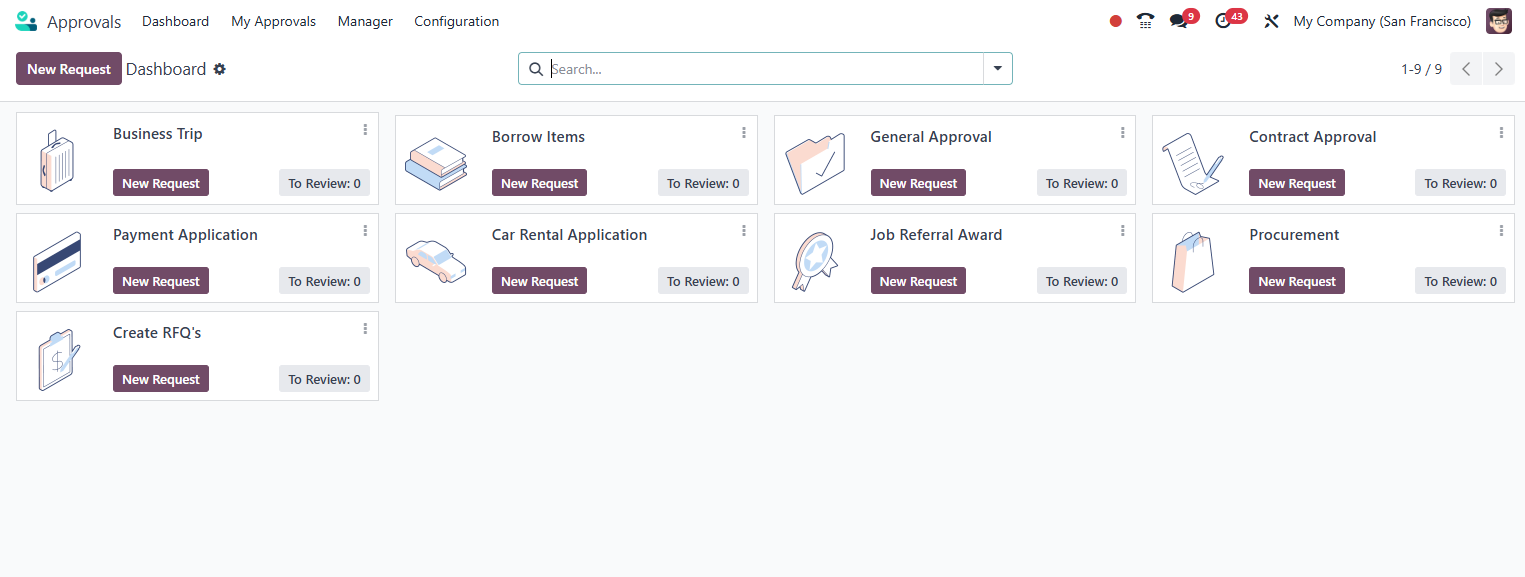
Odoo Approvals lets you create custom approval workflows for any internal process: purchases above a set amount, contracts, expenses, hiring and much more. No programming, with multiple approvers in a chain, automatic notifications and a full history for audit.
Productivity Official Odoo module
Why Odoo Approvals?
Real results our clients achieve.
No code configuration
Create approval types with custom fields, sequential or parallel approvers and criteria by amount or category. No line of code required.
Traceability and audit
Every workflow records who approved, who rejected, when and with what justification. An immutable history for internal audit or tax compliance purposes.
Real time notifications
Approvers receive alerts via Discuss, email and the mobile app the moment a request arrives. No approval forgotten in the inbox.
Integrated with the purchasing and expense flow
Connect approvals directly to purchase orders, expense reports and contracts. The approval automatically releases the next step of the process.
Features
What's included in this module.
Custom approval types
Create as many approval types as you need: purchase request, expense reimbursement, unplanned absence, vendor hiring. Each type has its own form and flow.
Chain approval (sequential)
Configure multiple approval levels in sequence: area manager, board, finance. Each level is notified only after the previous one approves.
Parallel approval
Send the request to several approvers at the same time. Define whether unanimity is required or at least one approver to move forward.
Monetary value criteria
Configure automatic rules: purchases below R$5,000 approved by the manager, above that requires board approval. The system applies the correct flow automatically.
Custom fields on the form
Add text, selection, date or currency fields to the request form. Collect exactly the information the approver needs to decide.
Decision history and log
Every action (approval, rejection, delegation) is recorded with a timestamp, user and optional comment. The log is protected against later editing.
Approval delegation
Approvers can temporarily delegate their responsibilities to a substitute during vacation or absences, with no interruption to the workflow.
Pending approvals dashboard
Consolidated view of all requests awaiting a response, filtered by type, requester or creation date. SLA indicators for overdue approvals.
Integration with Odoo modules
Approvals can be triggered automatically by events in Purchase, Expenses, HR or Contracts. The approval releases the next step with no manual intervention.
Rejection with mandatory justification
Configure mandatory reason fields when rejecting a request. This ensures transparency and provides data for continuous process improvement.
Native integrations
Odoo Approvals connects natively with other Odoo modules, no external integration.
Why implement with KMEE
KMEE has extensive experience mapping and digitizing approval processes for Brazilian companies, especially in contexts of SOX compliance, tax audit and internal controls required by certified ERPs. We model the flows together with the customer, configure the authorization levels according to the compliance policy and train the approvers to ensure adoption from the very first day of use.
About KMEEWho it's for
Scenarios where this module delivers the most value.
Spending control by authorization level
A distributor configures automatic approval for purchases above R$10,000, requiring the CFO's sign off. The purchase order is only generated after approval, eliminating unauthorized purchases.
Vendor contract approval
Legal and the board need to approve new service contracts in parallel. The system waits for both opinions before releasing the digital signature.
Expense reimbursement with receipt
Employees submit expense reports with an attached invoice. The manager gets a notification on mobile and approves or rejects with one click, directly from the app.
Overtime and time bank approval
The HR module triggers an approval workflow whenever an employee logs more than 2 hours of overtime in a single day, ensuring compliance with the CLT.
Frequently Asked Questions
Can I create approvals by amount in reais (R$)?
Yes. Odoo Approvals supports approval criteria based on numeric or monetary fields on the request form. You configure value ranges (e.g., up to R$5,000 approved by the manager, above R$5,000 requires the board) with no programming at all. The system automatically applies the correct flow based on the amount entered in the request.
Can an approver approve from their phone?
Yes. The Odoo mobile app shows all pending approvals with push notification. The approver sees the full form, the attachments and can approve, reject or ask for more information directly from the smartphone, with no need to access a computer.
What happens if the approver is on vacation?
Odoo Approvals lets you configure a temporary substitute for the absence period. In addition, you can set a maximum deadline (SLA) for each approval type. If there is no response within that deadline, the system can automatically escalate to the next level or notify the administrator.
Do approvals integrate with Odoo's purchasing process?
Yes. You can configure the Purchase module to require approval before confirming an order above a certain amount. The Approvals workflow is triggered automatically, and the order only moves forward to the vendor after all required approvals are granted.
Does the approval history support tax audits?
The approval log records every decision with date, time, user and justification, and it cannot be altered retroactively by regular users. This meets internal audit requirements and can complement controls required by SPED, SOX (for multinationals) and ISO standards. KMEE guides customers on how to export these records for compliance reports.
Industries that use it
Complete solutions for your industry.
- Manufacturing MRP, production planning, quality control and end-to-end traceability.
- Distribution WMS, route planning, fleet management and full fiscal integration.
- Government Public sector compliance, procurement, transparency and contract management.
- Services Project management, timesheets, recurring contracts and automated invoicing.
Explore all Odoo modules
View full catalogStart with a free assessment
Thirty minutes to understand your operation and tell you what to fix first, in the right order. No commitment.