Financial Analysis with Real Time Data from Odoo
Smart spreadsheets with live ERP data
Odoo Spreadsheet combines the familiarity of spreadsheets with the power of live ERP data, with no manual exports and no outdated data. Build financial dashboards, dynamic P&L statements, cash flow projections and profitability analyses directly connected to Odoo Accounting, with automatic updates and real time collaboration.
Finance Official Odoo module
Why Odoo Dashboards?
Real results our clients achieve.
Always Up to Date Data
Odoo Spreadsheet's formulas query the ERP database in real time. No manual exports, no outdated versions circulating by email, the number you see is the real number at that moment.
Real Time Collaboration
Multiple users edit the same spreadsheet simultaneously, with access control by tab and by cell. Comments, change history and notifications integrated with Odoo Discuss.
Native Pivot Tables
Automatic pivots connected to Odoo's models (sales, purchases, accounting, inventory). Drill-down from the totals to the source document with a double click, no macros, no VBA.
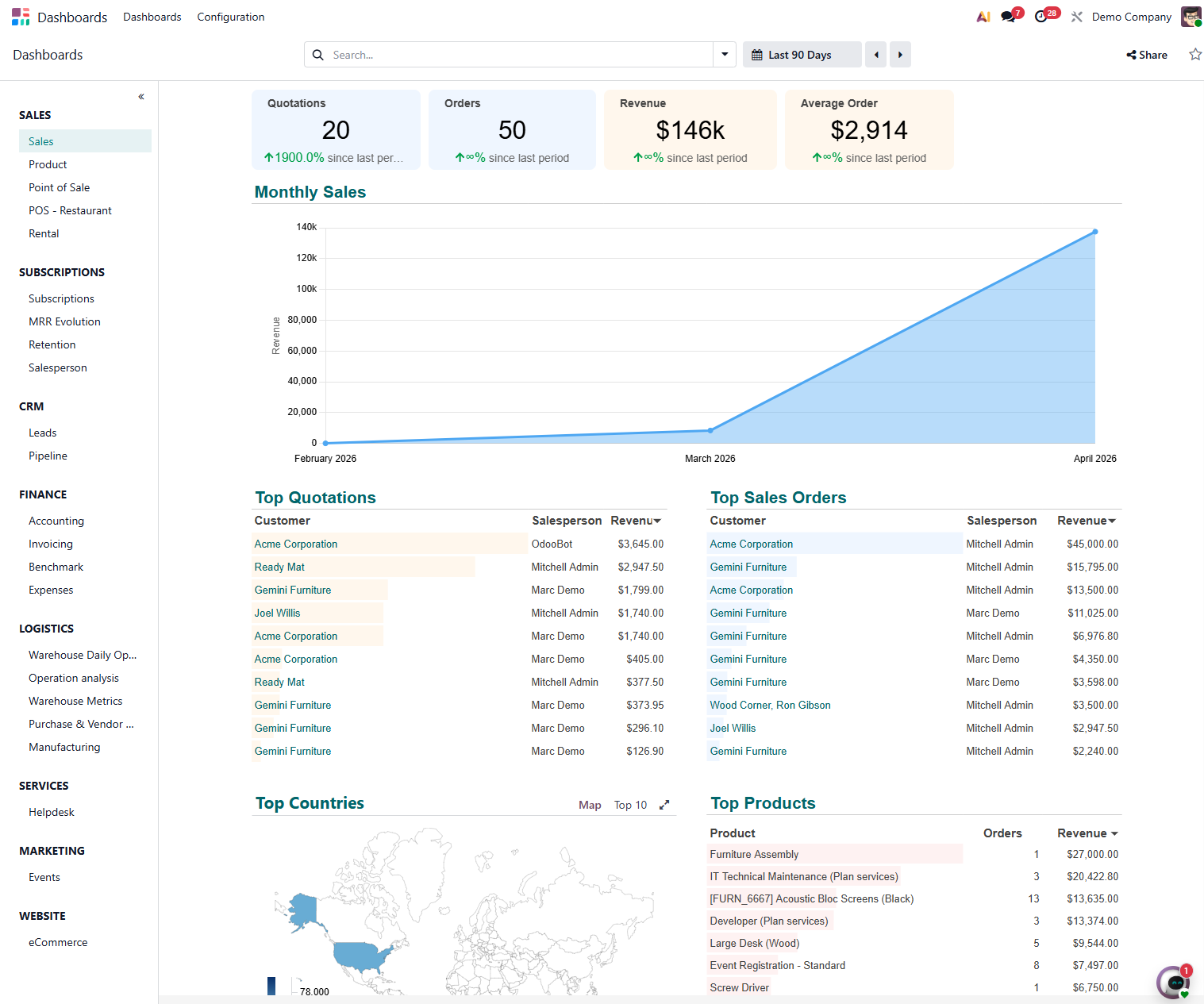
Embedded Management Dashboards
Publish spreadsheets as dashboards on the Odoo portal, accessible from a phone. Directors and managers view financial KPIs without needing access to the accounting module.
Features
What's included in this module.
Native Odoo Formulas
Special functions such as ODOO.PIVOT, ODOO.LIST and ODOO.FILTER query data directly from the ERP. Syntax similar to Excel/Google Sheets for quick adoption by the finance team.
Dynamic P&L and Balance Sheet
Ready made templates for the Income Statement and Balance Sheet connected to Odoo Accounting. Filter by company, period, cost center or project with instant updates to the totals.
Cash Flow Analysis
Cash flow projection combining actual data (bank accounts) and projected data (invoices due, open orders). What-if scenarios with editable parameters right in the spreadsheet.
Integrated Pivot Tables
Create pivots connected to any Odoo model: sales by salesperson and product, purchases by supplier and category, hours by project and customer. Live data, no import needed.
Charts and Visualizations
Bar, line, pie and area charts connected to the ERP data, updated automatically. Embed the charts in Odoo dashboards or export them for presentations.
Budget Management
Build budgets in the spreadsheet, publish them in Odoo and track actual versus planned automatically. Budget variance alerts configurable by account and by percentage.
Product Profitability Analysis
Cross-reference product cost data (manufacturing or purchase), sales price (sales) and actual margin (accounting) in a single spreadsheet. Identify products with negative margins without checking multiple modules.
Export and Printing
Export spreadsheets to XLSX (Excel), PDF or CSV with one click. Financial reports formatted for printing or sending to an external accountant, with data always up to date at the moment of export.
Native integrations
Odoo Dashboards connects natively with other Odoo modules, no external integration.
Why implement with KMEE
KMEE develops customized Odoo Spreadsheet templates for each client's financial needs: P&L following the NBC standards, inventory turnover analysis by ABC, KPI dashboards for the specific business model (retail, services, manufacturing). Our team combines accounting and technical knowledge to build spreadsheets that definitively replace Excel in the finance department's routine, with reliable data, access control and auditing.
About KMEEWho it's for
Scenarios where this module delivers the most value.
Monthly Financial Report for Leadership
The controller needs to present the P&L, Balance Sheet and cash flow to leadership every month. With Odoo Spreadsheet, the reports are prepared once as a template and updated automatically every month, the controller just validates and sends the generated PDF, with no copying and pasting data from the accounting system.
Profitability Analysis by Sales Channel
A company that sells through e-commerce, marketplace and a sales force wants to compare the profitability of each channel. Odoo Spreadsheet cross-references revenue, cost of goods, freight, commissions and returns for each channel in a dynamic pivot, with drill-down to the individual order.
Budget Planning and Control
The finance department builds the annual budget in the Odoo spreadsheet, distributing targets by accounting account, cost center and month. During the year, the actuals are fed automatically from accounting and the percentage variance is calculated in real time.
Corporate Group Consolidation
The controllership of a group with 3 companies needs a consolidated view of the P&L and Balance Sheet. With Odoo Spreadsheet, a single spreadsheet pulls data from the 3 companies simultaneously with intercompany transaction elimination configured directly in the formulas.
Frequently Asked Questions
Does Odoo Spreadsheet completely replace Excel for financial analysis?
For most routine financial analyses (P&L, Balance Sheet, cash flow, budget versus actual, profitability by product) Odoo Spreadsheet replaces Excel with significant advantages: data always up to date directly from the ERP with no manual export, real time collaboration and access control integrated with Odoo. In practice, companies implemented by KMEE reduce their Excel usage by 70 to 90 percent after adopting Odoo Spreadsheet.
Are the spreadsheet's data updated automatically or do I need to update manually?
Data is updated automatically when you open the spreadsheet or when you click the refresh button. Unlike Excel, where the data is a snapshot from the moment of export, Odoo Spreadsheet queries the ERP database every time it is opened or refreshed. You can configure periodic automatic refresh for dashboards that stay open all day on monitoring screens.
Who can use Odoo Spreadsheet, do I need to be a financial analyst?
No. Odoo Spreadsheet was designed to be accessible to any user familiar with Excel or Google Sheets. The finance team creates the templates and dashboards once, and managers and directors access the ready made reports without needing to understand the formulas. Access control allows each user to see only the data relevant to their role.
Is it possible to do sensitivity analysis and what-if scenarios in Odoo Spreadsheet?
Yes. You can create editable parameter cells (revenue growth rate, exchange rate variation, raw material cost) that feed formulas connected to the ERP. The analyst changes the parameter and the projection recalculates instantly. For more complex scenarios with multiple variables, Odoo Spreadsheet can be combined with historical ERP data as a base and manual projections in the scenario cells.
Does Odoo Spreadsheet work on mobile devices to check dashboards?
Yes. Spreadsheets published as dashboards in Odoo are accessible through the mobile browser (iOS and Android) with a responsive layout. For viewing KPIs and charts, the mobile experience is adequate. For editing and creating complex spreadsheets, desktop use is recommended. KMEE configures specific dashboards for mobile access with the most important indicators for each manager profile.
Industries that use it
Complete solutions for your industry.
- Retail POS, e-commerce, multichannel inventory management and integrated financial control.
- Services Project management, timesheets, recurring contracts and automated invoicing.
- Distribution WMS, route planning, fleet management and full fiscal integration.
- Manufacturing MRP, production planning, quality control and end-to-end traceability.
Explore all Odoo modules
View full catalogStart with a free assessment
Thirty minutes to understand your operation and tell you what to fix first, in the right order. No commitment.